This is the first article in an exclusive, step-by-step series for paid subscribers of our newsletter. Over the coming weeks, I’ll guide you through the full process of building a practical, automated web scraping script to collect football match data from FotMob, using Python.
The idea here is simple:
instead of dumping a huge amount of information in a single post, we’ll build everything gradually, one logical step at a time. That way, you can truly understand what’s happening under the hood—without feeling overwhelmed.
If you care about football data, original analysis, and independence from third-party datasets, this series is for you.
Why This Series Exists
In football analytics, data is power—but access to data is often the real bottleneck.
Many analysts rely entirely on external platforms, APIs with strict limits, or datasets that may disappear, change structure, or suddenly become paid. Web scraping offers a way out of that dependency.
By the end of this series, you’ll be able to:
Collect match data directly from the source
Automate the process with minimal manual effort
Organize the data for analysis
Create visuals such as xG maps, just like the ones available for free in the Football Hacking web app
And more importantly:
you’ll unlock matches and competitions that aren’t available in the app, opening the door to original ideas and custom workflows.
👉 If you’re not yet a subscriber, this is the perfect time to join the newsletter.
Paid subscribers get access to the full series and future exclusive content.
What Is Web Scraping (and Why It Matters)?
Web scraping is the process of programmatically collecting data from websites by simulating how a browser accesses information.
In practice, this means:
Sending requests similar to those made by your browser
Receiving structured responses (often JSON)
Parsing and storing that data for analysis
Why analysts use web scraping:
Independence from third-party datasets
Freedom to choose which matches and competitions to analyze
Ability to automate repetitive data collection
Faster experimentation and idea validation
In many cases, web scraping removes the need to rely on external paid APIs altogether—or at least reduces that dependency significantly.
About Automation in This Series
A key goal of this project is automation.
The final script will be designed so that:
You only need to change a few inputs
The rest of the process runs automatically
No repetitive copy-and-paste steps are required
We’ll also cover techniques to dynamically generate sensitive request parameters, so you don’t have to manually update them every time you scrape data.
The Match We’ll Use as an Example
Throughout this series, we’ll work with a real match as a concrete example:
Match: Manchester City vs Brighton & Hove Albion
Competition: Premier League
Round: Matchday 21
Season: 2025/2026
Final score: 1–1
Date: January 7, 2026
Using a real match helps ensure everything we do is practical, reproducible, and relevant.

Step 1: Accessing the Match on FotMob
First, go to FotMob and navigate to the match page for Manchester City vs Brighton from Matchday 21 of the 2025/26 Premier League season.
Once you’re on the match page, we’ll start inspecting how the data is loaded behind the scenes.
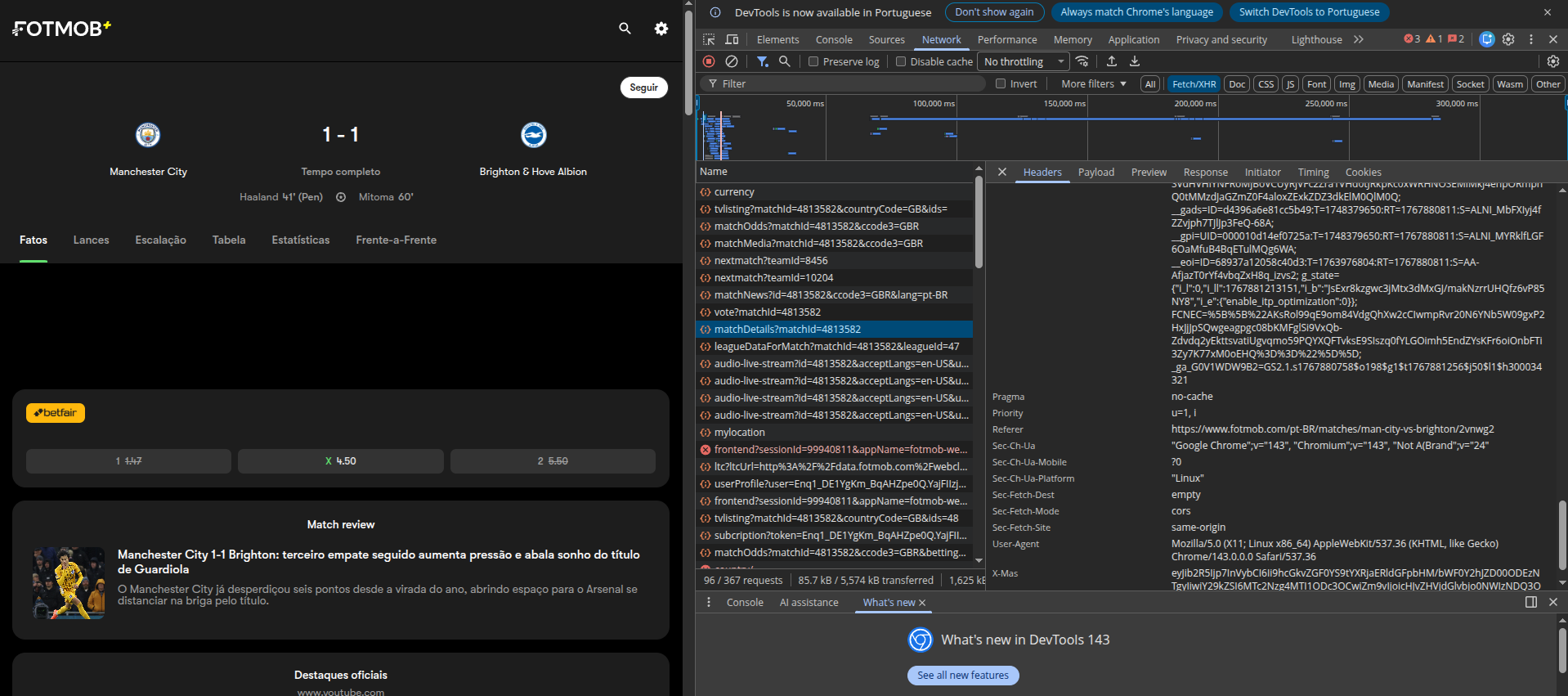
Step 2: Opening Developer Tools
With the match page open:
Press Ctrl + Shift + C on your keyboard
This opens the Developer Tools in your browser
Navigate to the Network tab
Inside Network, select Fetch/XHR
This section shows all background requests your browser makes to fetch data—this is where the magic happens.
Step 3: Identifying the Correct Request
In the Fetch/XHR list:
Locate the request highlighted in the illustration
Click on it
Then open the Headers tab
Scroll down to Response Headers.
Here, we can see how the server expects a “real” browser request to look.
Why Headers Matter (and Blocking Happens)
At this point, it’s important to understand two concepts:
What Is an API?
An API is simply an interface that allows software to communicate with a server in a structured way. Even if a website doesn’t advertise an API, many of its internal requests behave exactly like one.
Why Blocking Happens
Websites often block requests that:
Don’t resemble real browser traffic
Are missing key headers
Are sent too frequently
That’s why headers matter so much.
The Most Important Headers
In this series, we’ll pay special attention to:
referer
x-mas
cookie
These fields are critical to making our request look as close as possible to a legitimate browser access.


💡 Important:
I’ll show you how to dynamically generate the referer and x-mas values, so you don’t need to manually copy and paste them every time you want to scrape match data.
Verifying Data Coverage (xG Availability)
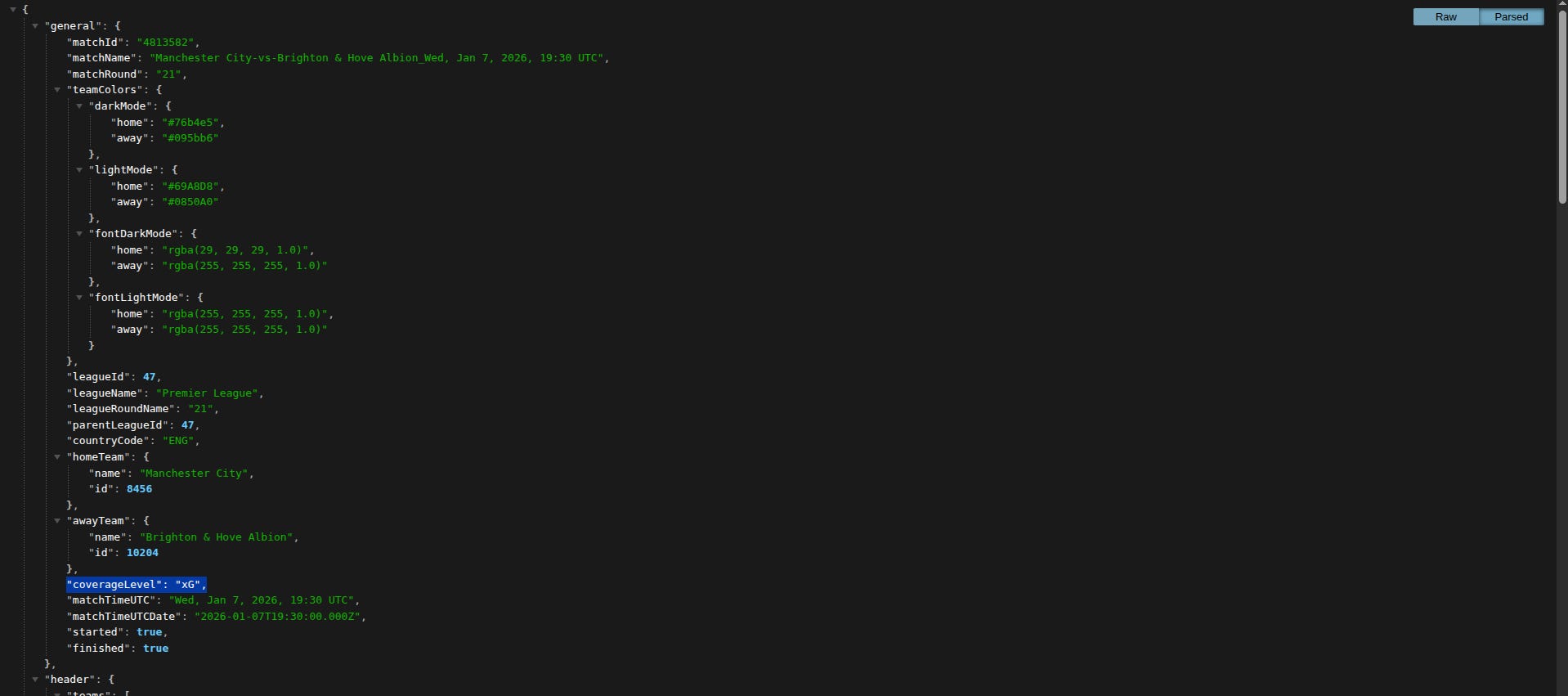
Now, double-click the selected request.
You’ll see the response payload, usually in JSON format.
One key thing to observe:
This match does include xG data
Not all matches on FotMob have this level of coverage
Learning to quickly verify this will save you a lot of time when scaling your workflow.
What You’ll Be Able to Do at the End of the Series
Once the full process is complete, you’ll be able to:
Download match data programmatically
Organize it in a clean structure
Build an xG map visualization
Replicate (and extend) visuals available in the Football Hacking web app
This also means:
Accessing matches not yet available in the app
Experimenting with other available variables
Developing original analytical ideas
Do You Need Advanced Python?
No—but basic Python knowledge is required.
If you’re not fully comfortable with Python yet:
You can still follow the series conceptually
You’ll understand how the process works
And who knows? This might be the spark that pushes you to dive deeper into Python for football analytics ⚽🐍
This Article Covers Only the First Step
This post focuses only on the initial inspection phase:
Understanding where the data comes from
Identifying the correct requests
Learning why headers and APIs matter
In the next articles, we’ll move on to:
Writing the first lines of the script
Automating requests
Handling responses safely
👉 Subscribe to the newsletter to follow this series step by step
👉 Upgrade to a paid plan to unlock the next chapters and future exclusive content
👉 Visit the Football Hacking web app to explore free xG maps and match data right now
This is just the beginning.
If you’ve ever wanted full control over your football data workflow—this series was made for you.